AI GIF 얼굴 바꾸기
내 작업물
아직 작업물이 없습니다
사진과 얼굴을 업로드해 첫 작품을 만들어 보세요
AI GIF 얼굴 바꾸기는 애니메이션이 원래대로 재생되는 상태에서 GIF 속 얼굴을 원하는 얼굴로 바꿔 넣는 기술입니다. GIF와 얼굴 사진을 업로드하면 AI가 모든 프레임에서 얼굴을 감지해 교체하고, 원본의 타이밍과 루프를 그대로 유지한 채 애니메이션을 다시 조립합니다. 이 프레임 단위 방식 덕분에 표정과 움직임이 억지로 붙여 넣은 느낌 없이 자연스럽게 보입니다. 유행하는 밈 템플릿이나 리액션 움짤을 내가 주인공인 GIF로 만드는 가장 빠른 방법이죠. 클래식한 폭소 루프, 드라마틱한 곁눈질, 단톡방에서 일주일 내내 돌고 있는 그 밈에 내 얼굴을 넣어 보세요. 모든 작업은 브라우저에서 온라인으로 진행되고, 결과물은 HD 화질에 워터마크가 없으며, 처음 몇 번은 무료 크레딧으로 이용할 수 있습니다. 실패하면 크레딧은 즉시 환불됩니다.
움직이는 GIF 얼굴 바꾸기 예시
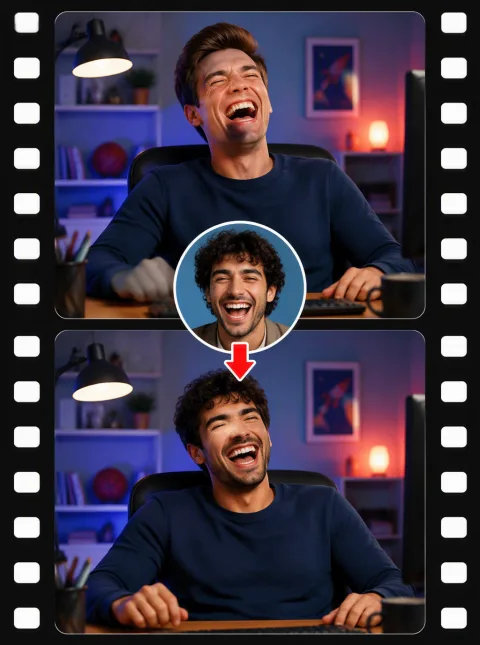
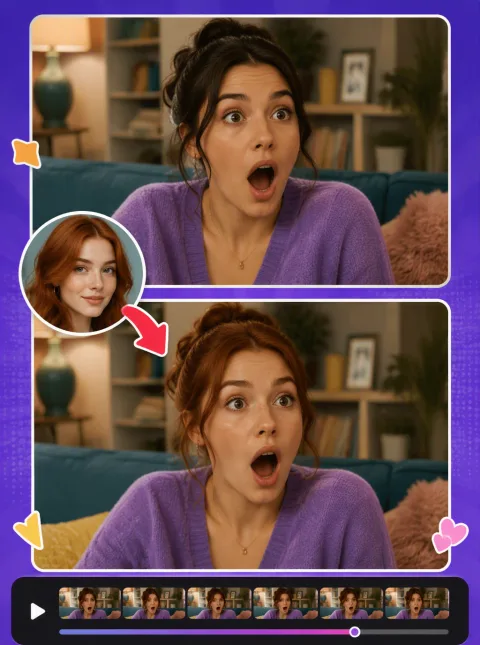
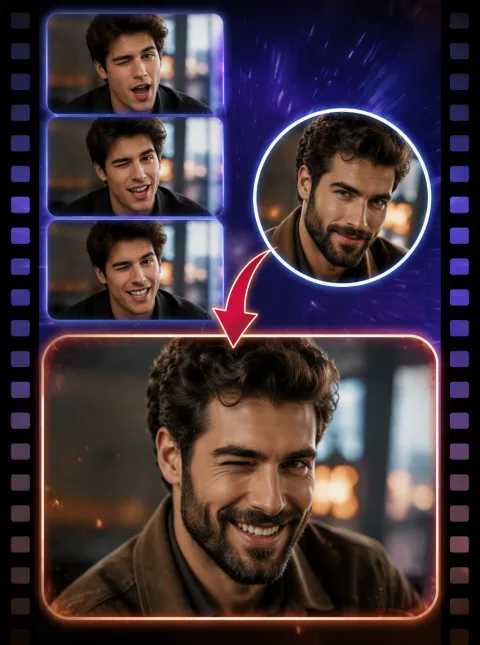
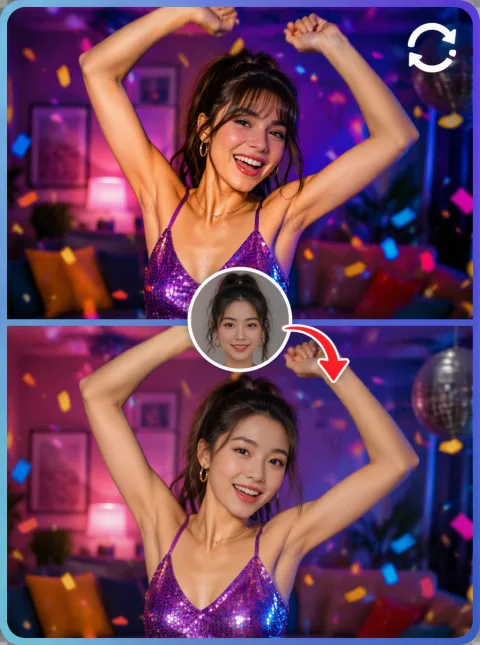
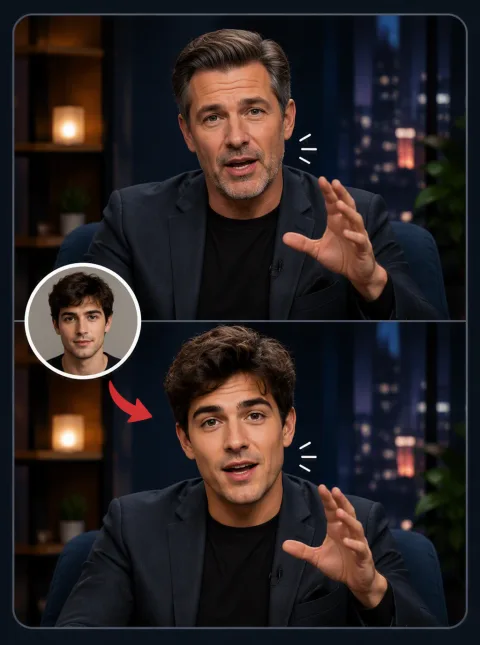
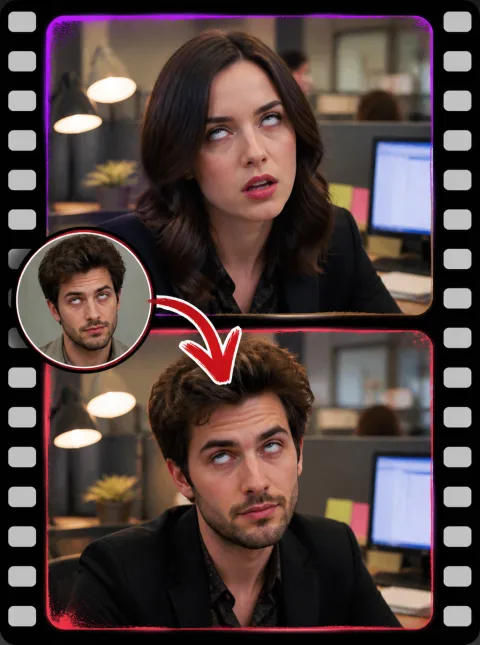
GIF 얼굴 바꾸기 3단계
- 1
GIF 업로드
편집할 움직이는 GIF를 선택하세요(최대 10MB). 애니메이션은 그대로 유지되고 얼굴만 교체됩니다.
- 2
대상 얼굴 추가
GIF에 넣고 싶은 얼굴의 선명한 정면 사진(PNG, JPEG, WebP, 최대 10MB)을 업로드하세요.
- 3
얼굴 바꾸고 다운로드
AI가 GIF를 프레임 단위로 처리합니다. 대부분의 클립은 프레임 수에 따라 30초~2분 안에 완료됩니다. 결과를 미리 본 뒤 HD 화질의 워터마크 없는 GIF를 다운로드하세요. 파일이 클수록 크레딧이 더 소모되며, 정확한 비용은 제출 전에 표시됩니다.
우리 GIF 얼굴 바꾸기를 써야 하는 이유
프레임 단위 AI, 깜빡임 없음
모든 프레임에서 얼굴을 개별적으로 감지·교체한 뒤 원본 프레임 속도로 애니메이션을 다시 조립합니다. 새 얼굴이 고개 돌림과 표정 변화를 그대로 따라가며 떨림, 잔상, 갑작스러운 튐이 없습니다.
HD 출력, 워터마크 없음, 무료 체험
완성된 GIF는 원본 해상도와 타이밍을 유지하며 워터마크가 절대 추가되지 않습니다. 회원가입과 매일 출석 체크로 무료 크레딧을 받을 수 있고, 이후에는 스왑당 결제 방식입니다. 구독이 필요 없으며 실패한 작업은 자동으로 환불됩니다.
내 계정에만 비공개 보관
업로드한 파일, 얼굴 사진, 완성된 GIF는 오직 본인만 볼 수 있습니다. 어디에도 공개되거나 다른 용도로 사용되지 않으며, 원할 때 언제든 파일을 영구 삭제할 수 있습니다.
GIF 얼굴 바꾸기로 만들 수 있는 것들
내가 주인공인 밈 템플릿
유행하는 밈 GIF — distracted boyfriend(한눈파는 남자친구), grumpy cat의 째려봄, blinking guy(눈 깜빡이는 남자) — 에 내 얼굴을 넣어 보세요. 밈의 주인공이 진짜 나라면 웃음은 두 배가 됩니다.
단톡방용 리액션 움짤
눈 굴리기, 느린 박수, 이마 짚기, 놀란 표정에 내(또는 친구) 얼굴을 넣어 보세요. 모든 채팅 답장을 우리끼리만 아는 개그로 만들어 주는 나만의 리액션 팩을 만들 수 있습니다.
영화·드라마 명장면 카메오
드라마틱한 등장, 마이크 드롭, 슬로모션 워킹 같은 상징적인 애니메이션 장면에 나를 넣어 보세요. GIF 얼굴 바꾸기로 어디서든 공유할 수 있는 5초짜리 카메오가 완성됩니다.
생일·명절 서프라이즈
친구 얼굴을 춤추는 축하 루프나 명절 인사 GIF에 넣어 생일에 보내 보세요. 커스텀 움짤 카드는 문자 메시지보다 언제나 한 수 위입니다.
자주 묻는 질문
GIF 속 얼굴은 어떻게 바꾸나요?
GIF를 업로드한 뒤 넣고 싶은 얼굴 이미지를 업로드하세요. "얼굴 바꾸기"를 클릭하면 AI가 애니메이션의 모든 프레임에 새 얼굴을 적용합니다. 결과물은 GIF로 다운로드됩니다.
지원 파일과 GIF 최대 크기는 어떻게 되나요?
원본은 최대 10MB의 GIF 파일이어야 하고, 대상 얼굴은 최대 10MB의 정지 이미지(PNG, JPEG, WebP)입니다. 품질과 속도의 균형을 위해 약 100프레임 이하의 GIF를 권장합니다. 아주 긴 루프도 작동하지만 시간이 더 걸리고 크레딧도 더 소모됩니다.
GIF 얼굴 바꾸기 비용은 어떻게 책정되나요?
GIF 얼굴 바꾸기는 파일 크기에 따라 요금이 책정되므로 GIF가 클수록 크레딧이 더 소모됩니다. 정확한 비용은 제출 전에 계산되어 표시되며, 실패한 작업은 자동으로 환불됩니다.
내 GIF와 업로드 파일은 비공개인가요?
네. 업로드한 GIF, 대상 얼굴 사진, 완성된 결과물은 내 계정에 귀속되어 나만 볼 수 있습니다. 직접 공유하지 않는 한 어떤 것도 게시되거나 공유되지 않으며, 업로드한 파일은 언제든 영구 삭제할 수 있습니다.
가장 선명한 GIF 얼굴 바꾸기 결과를 얻으려면? 애니메이션이 끊기지는 않나요?
가장 선명한 결과를 위해 조명이 좋고 또렷한 정면 대상 사진과 얼굴이 잘 보이는 GIF를 사용하세요. AI가 모든 프레임을 처리하므로 원본 애니메이션, 타이밍, 루프가 그대로 유지됩니다. 바뀐 GIF는 원본과 똑같이 매끄럽게 재생되며 끊기지 않습니다.
GIF 얼굴 바꾸기는 얼마나 걸리나요?
대부분의 GIF는 30초~2분 안에 완료됩니다. AI가 모든 프레임에서 얼굴을 개별적으로 교체하기 때문에 처리 시간은 프레임 수와 해상도에 비례합니다. 진행 표시로 작업 상태를 확인할 수 있고, 페이지를 벗어나도 나중에 내 작품에서 결과를 받아볼 수 있습니다.
GIF가 용량 제한을 초과하는데 어떻게 하나요?
GIF가 10MB를 넘으면 필요한 몇 초만 남기고 잘라내거나, 해상도를 낮추거나, 먼저 GIF 압축 도구를 거치세요. 저희의 무료 GIF 편집기와 압축 도구로 둘 다 할 수 있습니다. 짧고 밀도 있는 루프가 밈으로도 대개 더 재미있습니다.
왜 GIF에서 얼굴이 감지되지 않았나요?
얼굴 감지가 되려면 얼굴이 어느 정도 크고, 조명이 밝고, 잘 보여야 합니다. 너무 작은 얼굴, 심한 모션 블러, 극단적인 각도, 화질이 깨진 원본이 흔한 원인입니다. 대부분의 프레임에서 얼굴이 또렷하게 보이는 GIF와 정면을 향한 밝은 대상 사진을 사용해 보세요.
애니메이션이나 카툰 GIF에도 되나요?
AI는 실제 사람 얼굴로 학습되어 있어 애니메이션 캐릭터나 과장된 카툰 얼굴에서는 결과가 들쭉날쭉하고, 아예 감지되지 않을 수도 있습니다. 움짤 속 실사 얼굴에서 가장 잘 작동합니다. 카툰 스타일 원본도 시도해 볼 만하지만 결과는 약할 수 있습니다.
결과물 GIF에 워터마크가 붙거나 화질이 떨어지나요?
워터마크는 절대 없습니다. 무료 크레딧이든 유료든 동일합니다. 결과물은 원본 GIF의 해상도, 프레임 속도, 루프 설정을 그대로 유지하므로 바뀐 버전도 원본과 똑같이 재생됩니다. 넣은 만큼 나옵니다. 선명한 원본 GIF일수록 결과도 가장 선명합니다.
무료 GIF 얼굴 바꾸기 시작하기
GIF를 업로드하고 얼굴을 추가하면 AI가 프레임 단위로 얼굴을 바꿔 드립니다. HD 화질, 워터마크 없음, 바로 공유 가능. 지금 가입해 무료 크레딧을 받고 첫 움짤 얼굴 바꾸기를 만들어 보세요.